
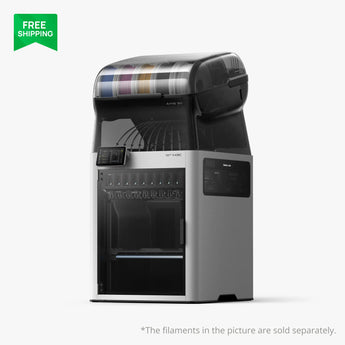


Bambu Lab H3C 3D Printer
Couldn't load pickup availability
Available to order — not currently stocked in-store. We can arrange shipment directly to your address or to our Lowell, Arkansas store for pickup. Contact us to confirm availability and estimated delivery timing. For store pickup, please wait until we notify you that your order is ready.
The Bambu Lab H3C combines a nine-material tool-changing system with a 330 × 320 × 325 mm build volume. It is a useful choice for multicolor models, flexible parts, and projects that combine materials. Every configuration listed here includes the H3C printer and AMS 3H; the bundles add filament or a dedicated printer stand.
What makes the H3C different?
- Nine independent material paths: tools remain docked, loaded, and preheated between changes. This reduces the purging needed when switching materials.
- Automatic material changes: Bambu rates material switching at six seconds. Actual job time and purge use depend on your model, materials, and settings.
- Soft TPU capability: the filament starter packs include 2.85 mm TPU 75A for flexible printing with the H3C's compatible tool and feed path.
- Enclosed filament handling: AMS 3H combines enclosed storage and automatic feeding with built-in filament drying.
- Temperature control: active chamber heating and cooling help manage the printing environment for different materials.
Key specifications
| Build volume | 330 × 320 × 325 mm |
|---|---|
| Material system | Nine independent material paths with automatic tool switching |
| Included filament system | AMS 3H in all four configurations |
| Manufacturer-rated material switching | Six seconds |
| Maximum nozzle temperature | 350°C |
| Maximum bed temperature | 120°C |
| Active chamber heating | Up to 65°C |
| Filament diameters | 1.75 mm and 2.85 mm with the appropriate tool and feed path |
| Filament drying | Built in; select drying settings appropriate to the filament |
Choose your configuration
| Configuration | Included package |
|---|---|
| H3C Combo | H3C printer and AMS 3H. |
| H3C Combo with Filament Starter Pack (TPU+CMYKW) | H3C Combo, one black TPU 75A filament item, and one PLA Palette CMYKW filament pack. |
| H3C Combo with Filament Starter Pack (Colourful TPU+CMYKW) | H3C Combo, one cyan TPU 75A filament item, and one PLA Palette CMYKW filament pack. |
| H3C Full Combo - Bambu Station L FRAME Edition | H3C Combo, one black TPU 75A filament item, one PLA Palette CMYKW filament pack, and one Bambu Station L Frame Edition. |
The Frame Edition stand provides a raised working position, storage underneath, and locking casters. It is the open-frame stand shown in the bundle, not an enclosed cabinet.
Common questions
Does the H3C Combo include AMS 3H?
Yes. All four configurations include the printer and AMS 3H. Bambu ships those components in separate packages, which may arrive at different times.
What is the difference between the two filament starter packs?
The TPU color: the TPU+CMYKW package includes black TPU 75A, while the Colourful TPU+CMYKW package includes cyan TPU 75A. Both include PLA Palette CMYKW.
What does CMYKW mean?
Cyan, magenta, yellow, black, and white. Bambu's PLA Palette uses these five base colors in calculated layers to produce a wider range of visible colors. This is a layered color workflow rather than liquid-ink mixing.
Is filament included with the standard Combo?
The standard Combo does not list either of these filament starter packs. Select a starter-pack or Frame Edition bundle if you want the listed TPU and PLA Palette materials included. Filament shown in general printer photos should not be treated as included.
Can I use the starter-pack TPU in any filament slot?
The supplied TPU is 2.85 mm TPU 75A. Use the H3C tool and feed path specified for that filament, rather than assuming it feeds like ordinary 1.75 mm PLA. Check Bambu's filament-loading instructions before use.
Can it cut, draw, or deboss?
Bambu lists automatic switching between printing and compatible cutting, drawing, and debossing tools. The bundle lists above do not identify those additional tools as included. Confirm the required accessories and current software support for the process you want to use.
Which package should I choose?
Choose the Combo if you already have the materials you need. Choose a starter pack to try soft TPU and the PLA Palette color workflow. Choose the Frame Edition bundle if you also want Bambu's dedicated stand and storage space.
Where can I review cybersecurity documentation?
Visit the Bambu Lab Trust Center certification page for the manufacturer's documentation.
Order through PwnCNC
PwnCNC is a Bambu Lab authorized reseller in Lowell, Arkansas. We operate a Bambu print farm and can help you compare machines, materials, and accessories for your projects.
Contact us to confirm supplier availability, package contents, shipping charges, and delivery expectations before ordering. Ask about delivery to your address or collection at our store. Printer, AMS, filament, and stand components may arrive separately. Images may show accessories or filament outside your selected package.
💬Videos may show earlier configurations or launch promotions. Refer to the product description for current inclusions.